Oops, I Deleted Production: Saving Black Friday with 1-Click PITR

It's Black Friday. Traffic is peaking on our Example App e-commerce store. You're monitoring the sales dashboard, and everything looks great.
Then, disaster strikes.
A developer, intending to clean up some test data, accidentally runs a DELETE command on the production database.
DELETE FROM sale WHERE id > 1000; -- Forgot the WHERE status = 'test' clause!
Poof. Hundreds of real customer orders just vanished. The phone starts ringing. The CEO is walking towards your desk.
In the old days, this would be the start of a very long, very bad night. But with Filess.io, it's just a 2-minute fix.
The Pain: The Manual Recovery Nightmare
If you were managing your own database server (the "hard way"), recovering from this would be a panic-inducing ordeal.
First, you'd have to hope you configured binary logs correctly before the incident:
# Did you remember to set this?
log_bin = /var/log/mysql/mysql-bin
expire_logs_days = 10
Then, you'd have to scramble to find your last full backup and start the manual replay process:
- Find the backup:
ls -l /backups/mariadb/full_backup_*.sql - Restore it:
mysql -u root -p < full_backup.sql(This takes time!) - Find the binlog position: Dig through files to find where the backup ended.
- Replay logs: Carefully construct a
mysqlbinlogcommand to replay everything up to the accident.
# One typo here and you corrupt data again
mysqlbinlog \
  --start-datetime="2025-11-21 14:00:00" \
  --stop-datetime="2025-11-21 17:32:58" \
  /var/log/mysql/mysql-bin.000123 | mysql -u root -p filess_example
It's slow, error-prone, and terrifying when money is on the line.
The Solution: Filess.io 1-Click Time Travel
With Filess.io, we handle the complexity for you. We automatically take physical backups and stream transaction logs continuously.
To save our Black Friday sales, you simply:
- Go to your database dashboard.
- Click "Point-in-Time Recovery".
- Select the exact time before the query ran (e.g.,
17:32:58).
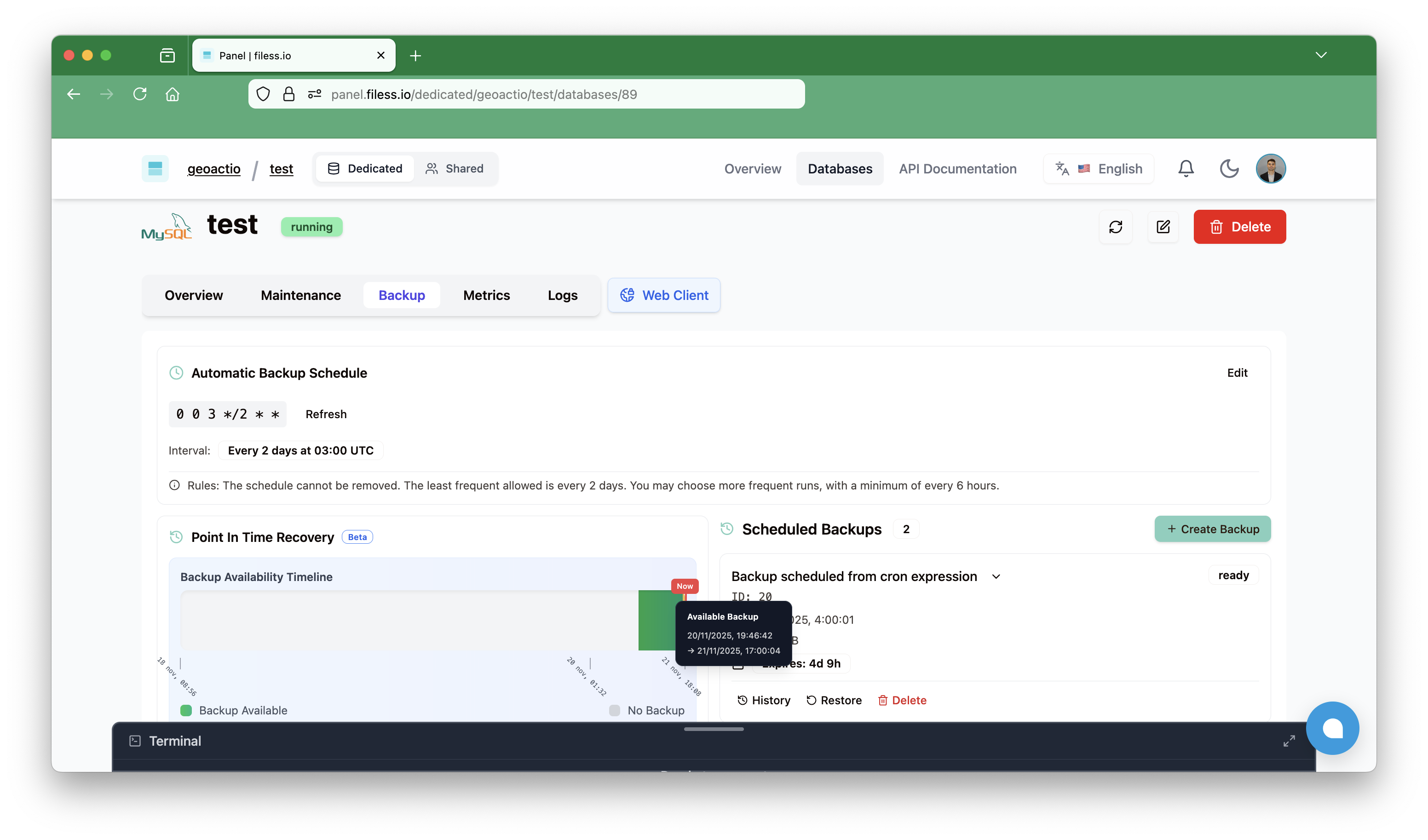
That's it.
Filess spins up a new database instance cloned from that exact second. Your original broken database stays there (just in case), and you get a fresh, perfect copy to verify.
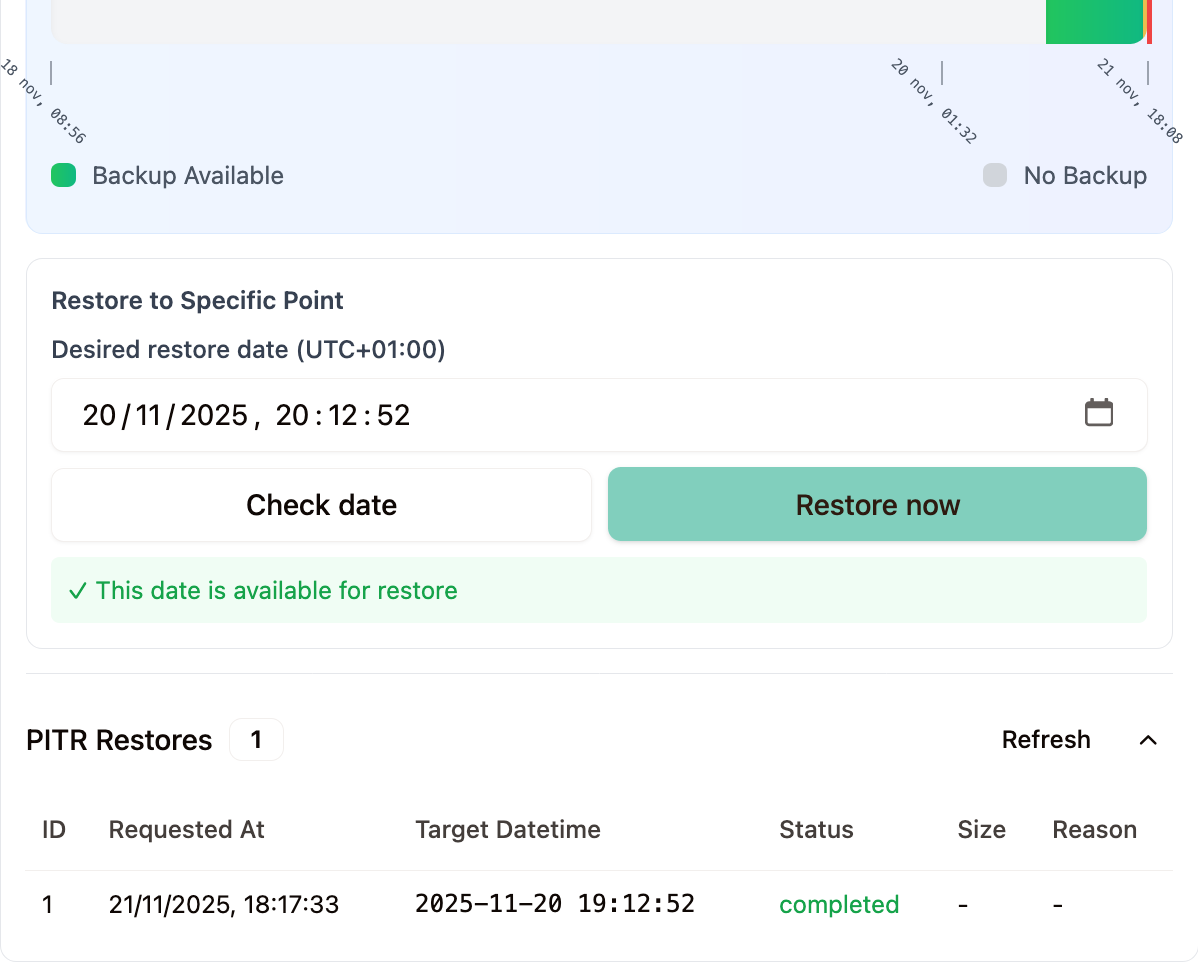
Verifying the Fix
Let's check our example-app data on the restored instance. We can run a quick query to see if our missing sales are back:
SELECT count(*) FROM sale WHERE id > 1000;
-- Result: 452 (They are back!)
Once verified, you just point your application to the new database endpoint. Crisis averted.
How It Works Under the Hood
We don't use magic, just rock-solid engineering.
- Physical Backups: We use tools like Percona XtraBackup or WAL-G to take non-blocking, physical snapshots of your disk. This is much faster than logical dumps (
mysqldump). - Continuous Archiving: Every transaction (write, update, delete) is written to a Write-Ahead Log (WAL) or Binary Log. We stream these logs to secure object storage in real-time.
- Automated Replay: When you request a restore, our orchestration engine spins up a fresh container, pulls the closest base backup, and automatically replays the logs up to your chosen timestamp.
You get the power of an enterprise DBA team, without hiring one.
Don't Wait for a Disaster
The best time to set up a recovery plan is before you need it. With Filess.io, it's enabled by default on all Dedicated plans.
Ready to sleep better at night?