Automated Backups and Point-in-Time Recovery (PITR)
Human errors are inevitable in software development: a developer might accidentally run a migration that deletes critical data, or a script might corrupt records. Point-in-Time Recovery (PITR) allows you to restore your database to any moment before the incident occurred, down to the exact second.
It's that easy with FILESS
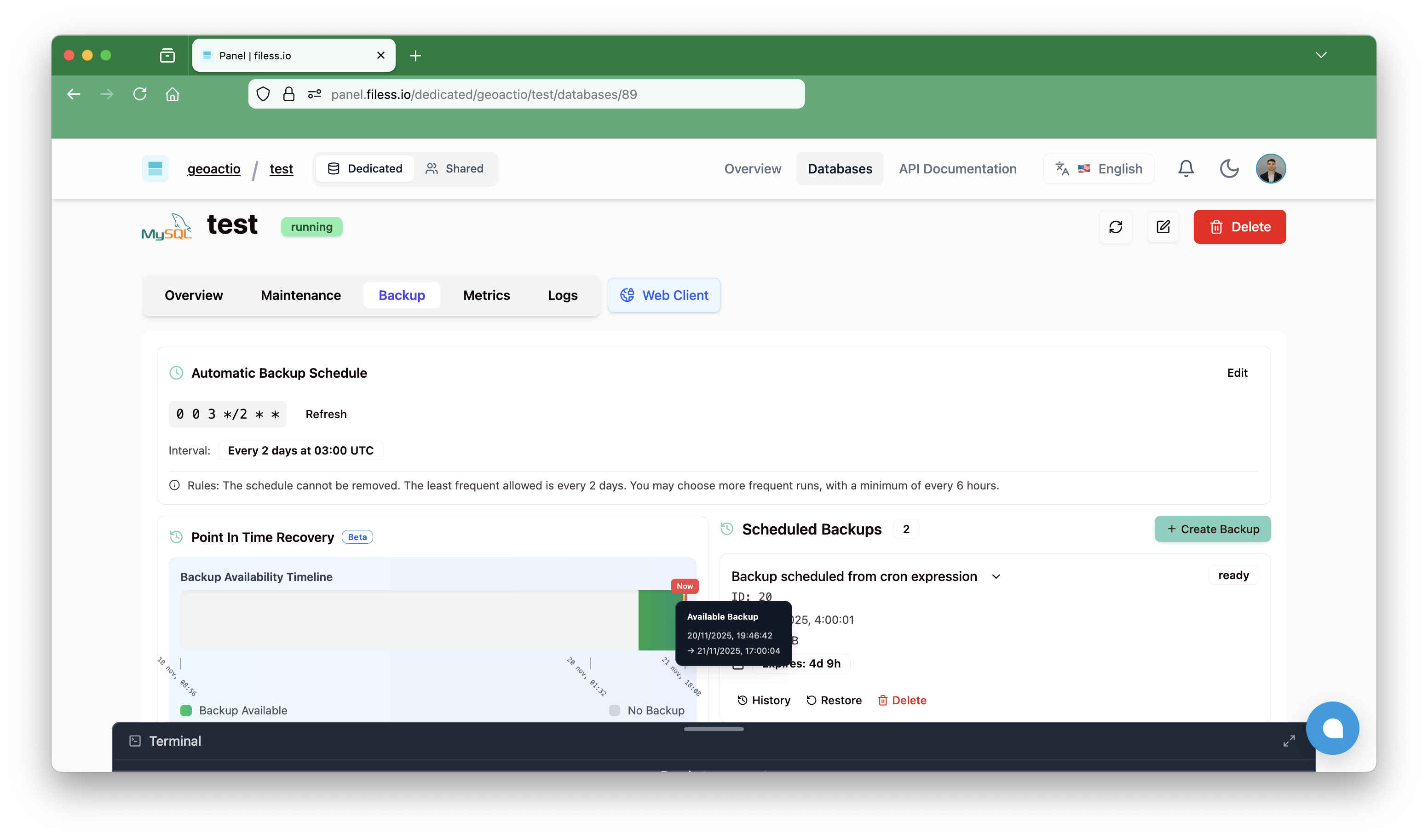
In this image we can see the available range to restore our database.
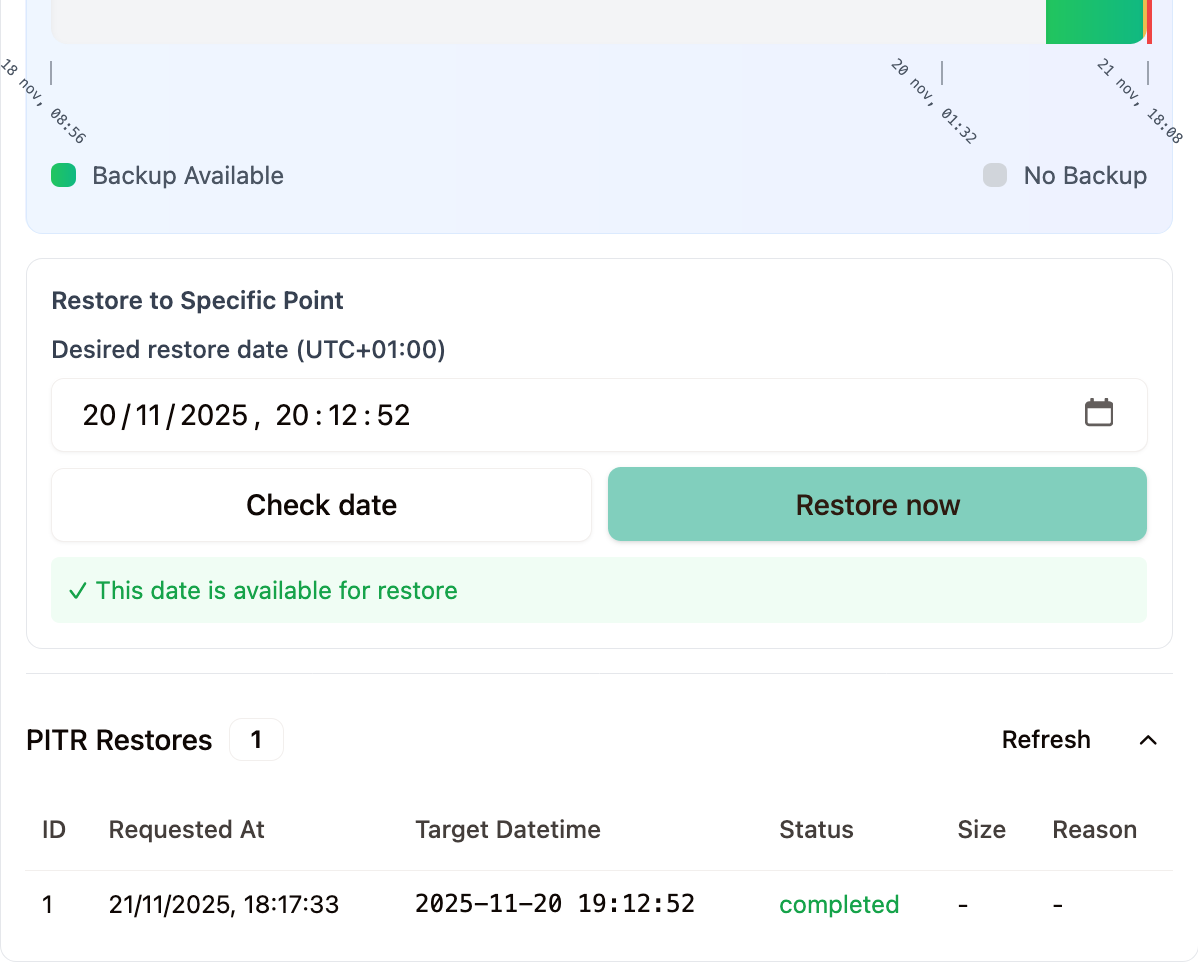
After verifying that the date before the disaster is available and launching the restoration task through the visual interface, we can see that the process has completed successfully.
Understanding PITR
Point-in-Time Recovery allows you to restore your database to a specific timestamp, recovering from:
- Accidental data deletion: "Oops, I deleted the wrong records"
- Corrupted updates: "The migration script had a bug"
- Malicious changes: "Someone ran a destructive query"
- Application bugs: "The code updated all prices to zero"
How PITR Works
PITR combines two components:
- Full Backups: Complete database snapshots taken periodically
- Binary Logs (or transactional): Transaction logs that record every change
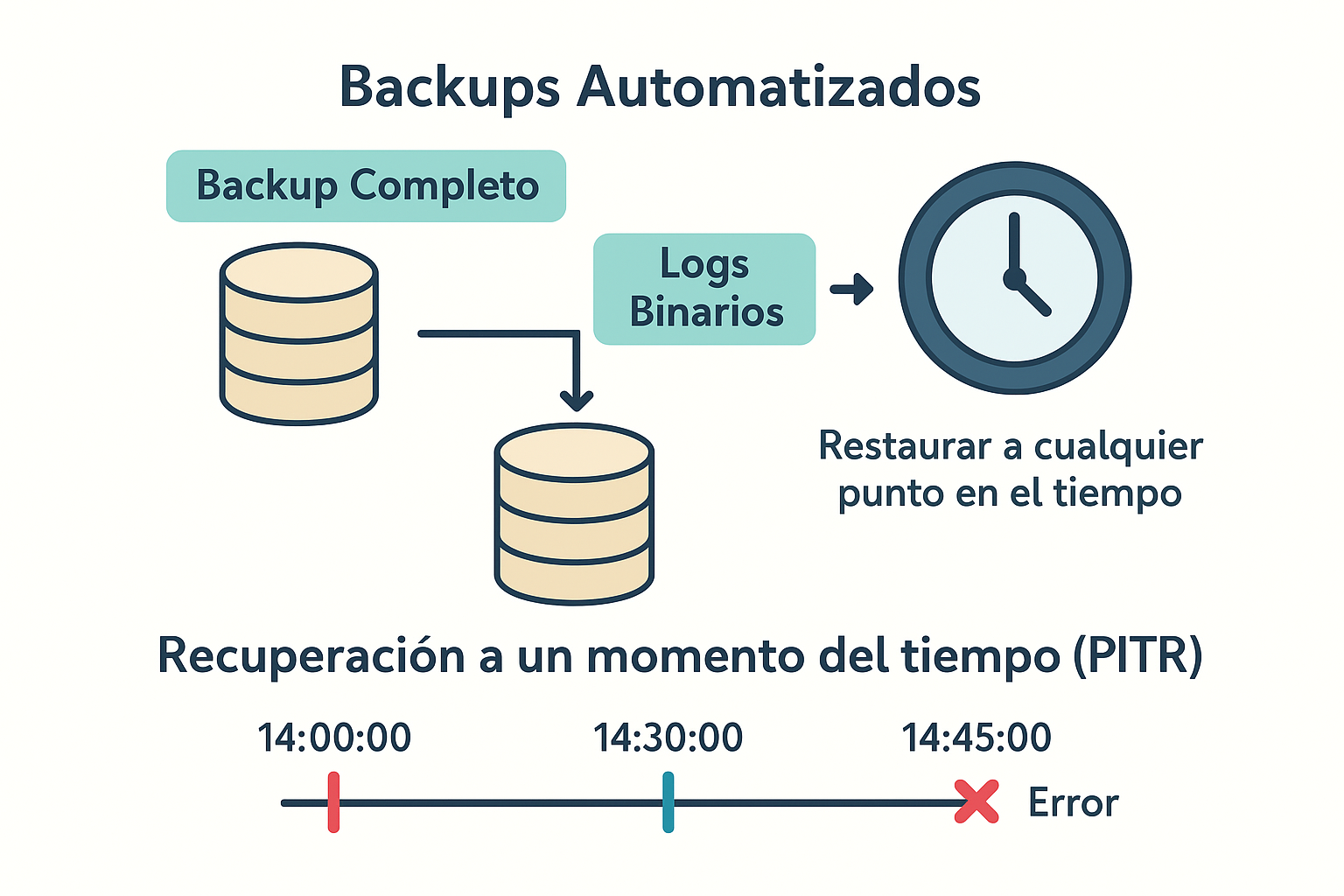
The diagram shows how full backups combined with binary logs allow restoring the database to any point in time, even one second before an error occurred.
A manual example in MariaDB
This can only be done if you have direct access to the database server.
Prerequisites
- Enable binary logs: these are the transaction logs where MariaDB stores everything that happens. Insert, Update, Delete, ... everything
To do this, we need to access the configuration file which is normally located in `` and configure it with
[mysqld]
server_id = 1
log_bin = /var/log/mysql/mysql-bin
max_binlog_size = 100M
binlog_format = mixed
expire_logs_days = 10
server_id: Required for replication, must be a unique value for each server in a replica environment.log_bin: Defines the path and base name of binary log files. If an absolute path is not specified, files will be created in MariaDB's data directory.max_binlog_size: Limits the maximum size of each binlog file (100M is a common value).binlog_format: Mixed is recommended for a balance between performance and security in replication.expire_logs_days: Specifies the number of days binlogs will be automatically retained before being deleted (optional, but recommended for disk space management).
Once we apply these changes and restart the server, we'll see that new files will start being created in /var/log/mysql/
# ls -latr /var/log/mysql/mysql-bin.*
-rw-rw—- 1 mysql mysql 10486 Jul 7 06:25 /var/log/mysql/mysql-bin.000001
-rw-rw—- 1 mysql mysql 64 Jul 7 06:25 /var/log/mysql/mysql-bin.index
-rw-rw—- 1 mysql mysql 2505782 Jul 7 08:30 /var/log/mysql/mysql-bin.000002
- Create periodic full database backups.
Theoretically, we could have an initial backup from when the database was created and apply all transactions that occurred from the start until the disaster, but in most cases this doesn't make sense because storing transaction logs is not easy to manage due to file sizes. Normally, full database backups are made periodically, so that if we want to restore the database to a point in time, we only need to get the last full backup before the disaster and apply all transactions from that last backup until the moment before the disaster.
For this, we can use mysqldump, MariaDB's standard tool for creating logical (SQL) backups. Here's an example script to create full backups:
#!/bin/bash
# backup-full.sh

BACKUP_DIR="/backups/mariadb"
TIMESTAMP=$(date +%Y%m%d_%H%M%S)
DB_NAME="filess_example"
DB_USER="backup_user"
DB_PASS="secure_password"
DB_HOST="localhost"

mkdir -p $BACKUP_DIR

mysqldump \
  --host=$DB_HOST \
  --user=$DB_USER \
  --password=$DB_PASS \
  --single-transaction \
  --routines \
  --triggers \
  --events \
  --master-data=2 \
  --flush-logs \
  $DB_NAME > $BACKUP_DIR/full_backup_$TIMESTAMP.sql

gzip $BACKUP_DIR/full_backup_$TIMESTAMP.sql

find $BACKUP_DIR -name "full_backup_*.sql.gz" -mtime +7 -delete

echo "Backup completed: full_backup_$TIMESTAMP.sql.gz"
Options shown:
-
--single-transaction: Creates a consistent backup without locking tables -
--master-data=2: Includes the binary log position needed for PITR (as a comment) -
--flush-logs: Rotates binary logs after backup, facilitating management -
--routines,--triggers,--events: Includes stored procedures, triggers, and events
Automation with Cron
To automate backups, we can use cron to schedule periodic executions:
# Edit crontab
crontab -e

# Daily backup at 2 AM
0 2 * * * /path/to/backup-full.sh >> /var/log/backup.log 2>&1
This will run the backup script every day at 2:00 AM and log the output to a log file.
Point-in-Time Recovery Process
Once we have full backups and binary logs enabled, the PITR recovery process is as follows:
- Identify the incident moment: Determine the exact timestamp we want to restore to
- Restore the most recent full backup before the incident
- Apply binary logs from the backup until the moment before the incident
Practical example:
# Step 1: Restore full backup
mysql -u root -p filess_example < /backups/mariadb/full_backup_20250115_140000.sql

# Step 2: Apply binary logs up to the incident moment
mysqlbinlog \
  --start-datetime="2025-01-15 14:00:00" \
  --stop-datetime="2025-01-15 14:45:00" \
  /var/log/mysql/mysql-bin.000123 | mysql -u root -p filess_example
This will restore the database to the exact state it had one second before the incident occurred.
Practical example with the example app
Simulate real traffic
In the example application you can simulate real traffic by running:
npm run simulate
...

--- Iteration 199 ---
[2025-11-21T17:35:47.844Z] Creating customer: David Jones ([email protected])
[2025-11-21T17:35:49.078Z] ✓ Customer created with ID: 89
[2025-11-21T17:35:49.078Z] ⏳ Waiting 3262ms before next action...

--- Iteration 200 (Stats every 50) ---
[2025-11-21T17:35:52.342Z] Creating customer: Mark Smith ([email protected])
[2025-11-21T17:35:53.562Z] ✓ Customer created with ID: 90

📊 Statistics (Iteration 200):
   Customers: 89
   Products: 99
   Sales: 71
   Purchases: 92
[2025-11-21T17:35:55.992Z] ⏳ Waiting 2572ms before next action...

--- Iteration 201 ---
[2025-11-21T17:35:59.473Z] Creating sale for customer 83 with 3 items (Total: $1322.32)

...
This script continuously creates customers, products, sales, and purchases, simulating a real production environment.
The incident
While the simulator is running, a developer accidentally executes:
DELETE FROM sale WHERE id IN (77, 113);
Two important sales have disappeared. The simulator keeps running, creating more data, which complicates recovery.
The solution with PITR
-
Identify the exact moment: Note the timestamp just before the DELETE (e.g.,
2025-11-21T17:32:58Z) -
Restore in Filess: From the console, select "Point-in-Time Recovery" and choose that timestamp
-
Validate: Verify that sales 77 and 113 are back:
SELECT id, total, status FROM sale WHERE id IN (77, 113);
The database is restored to the exact state before the error, without losing data created afterward (if restored to a temporary database) or restoring everything to the moment before the incident.
Next Steps
- Backup automation: Integrate with CI/CD pipelines
- Cloud storage: Store backups in S3/GCS with lifecycle policies
- Backup validation: Automated integrity checks
- Disaster recovery: Multi-region backup strategy
With automated backups and PITR in place, you can recover from any data loss incident quickly and confidently.